CANAIMA-ACCESIBLE
Es una iniciativa que persigue cubrir los requerimientos de las personas con alguna discapacidad. Su objetivo es un sistema completamente accesible que ofrezca la mayor cantidad posible de independencia, construido completamente sobre Software Libre. Visualizamos que CANAIMA-ACCESIBLE añadirá valor a los paquetes existentes, proporcionando parches para arreglar problemas muy específicos, dirigido a ciertos grupos de usuarios y usuarias, llevando a cabo pruebas de validación de accesibilidad y proporcionando sugerencias de modificaciones basadas en los resultados. También se persigue incorporar a la plataforma de GNU/Linux CANAIMA nuevos proyectos de desarrollo en materia de accesibilidad con mayor celeridad.
CANAIMA-ACCESS
Is an initiative that aims to meet the requirements of people with disabilities. His goal is a fully accessible system that offers the maximum amount of independence, built entirely on free software. CANAIMA-ACCESS envision that add value to existing packages, providing patches to solve very specific problems, led to certain user groups and users, conducting validation tests accessibility and providing suggestions for modifications based on the results. It also aims to incorporate the platform GNU / Linux CANAIMA new development projects on accessibility faster.
ACCESIBILIDAD EN GNOME
El equipo de Gnome ha optado por ofrecer una interfaz estándar entre tecnologías de asistencia por un lado y aplicaciones de usuarios por otro, según una estructura basada en capas (ver Figura 1).Toda la información que necesiten las tecnologías de asistencia la ofrecen las mismas aplicaciones y el escritorio mediante el framework de accesibilidad de Gnome
GNOME ACCESSIBILITY
The Gnome team has chosen to offer a standard interface between assistive technologies on the one hand and on the other user applications, as a structure based on layers (see Figure 1).
All information needed by the assistive technologies offer the same applications and the desktop using the GNOME Accessibility framework
The Gnome team has chosen to offer a standard interface between assistive technologies on the one hand and on the other user applications, as a structure based on layers (see Figure 1).
All information needed by the assistive technologies offer the same applications and the desktop using the GNOME Accessibility framework

La arquitectura de accesibilidad de GNOME se basa en tres tecnologías que proporcionan no sólo un sistema altamente accesible sino que también proporcionan una plataforma estable que facilita el desarrollo de nuevas aplicaciones accesibles, ellas son:
The GNOME Accessibility architecture is based on three technologies that provide not only a highly accessible but also provide a stable platform that facilitates the development of new applications available, they are:
AT-SPI (Assistive Technology Service Provider Interface)
Es una interfaz proveedora del servicio de tecnologías de accesibilidad, es la capa del sistema que se encarga de coordinar toda la información de accesibilidad: Las aplicaciones accesibles deberán informarle de todos sus eventos y de la estructura de su interfaz, y las aplicaciones de asistencia podrán pedirle a AT-SPI [2] esta información, o interactuar con las demás aplicaciones. AT-SPI contiene los componentes centrales de accesibilidad de GNOME. Permite a los distribuidores de tecnología de asistencia, como lectores de pantalla, pedir a todas las aplicaciones que se estén ejecutando en el escritorio información relativa a accesibilidad, a la vez que proporciona mecanismos de enlace para soportar otros conjuntos de herramientas distintos de GTK.
AT-SPI (Assistive Technology Service Provider Interface)
It is a service provider interface accessibility technologies, is the layer of the system that is responsible for coordinating all information accessibility: accessible applications shall inform all its events and the structure of its interface, and applications to attend may ask aT-SPI [2] this information, or interact with other applications.
AT-SPI contains the core components of GNOME Accessibility. Allows distributors of assistive technology such as screen readers, asking all applications running on the desktop information on accessibility, while providing liaison mechanisms to support other toolkits than GTK.
It is a service provider interface accessibility technologies, is the layer of the system that is responsible for coordinating all information accessibility: accessible applications shall inform all its events and the structure of its interface, and applications to attend may ask aT-SPI [2] this information, or interact with other applications.
AT-SPI contains the core components of GNOME Accessibility. Allows distributors of assistive technology such as screen readers, asking all applications running on the desktop information on accessibility, while providing liaison mechanisms to support other toolkits than GTK.
GTK+ Toolkit
GTK+ [3] es un conjunto de herramientas orientadas a objetos, de plataforma cruzada y lenguaje neutral, que son usadas para crear aplicaciones de Gnome. Los componentes GTK+ soportan la interfaz de accesibilidad de Gnome, por lo que usar esta libreria en los desarrollos de nuevas aplicaciones garantizará gran parte del trabajo necesario para que estas aplicaciones sean accesibles.ATK (Accesibility Toolkit)
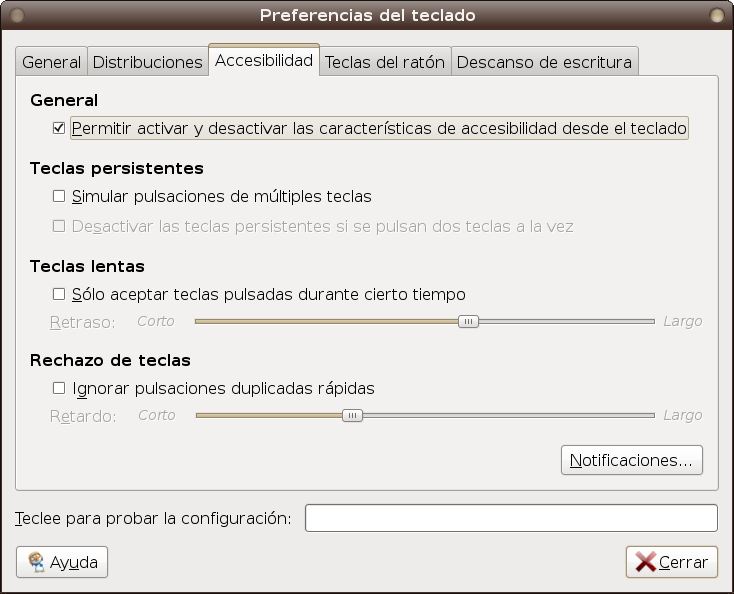
Preferencias del teclado
Seleccionando en el menú principal del escritorio Sistema-> Preferencias->Teclado y utilizando el botón de accesibilidad (ver Figura 2) se puede configurar el teclado de tal forma que facilite su uso por parte de las personas con discapacidad motora. Se puede activar las teclas persistentes, activar sonidos al presionar algunas teclas especiales, entre otras opciones. En el botón de Teclas del ratón es posible simular el uso del ratón usando el teclado.
GTK + Toolkit
GTK + [3] is a set of object-oriented tools, cross-platform and language neutral, that are used to create Gnome applications. The components support GTK + interface for Gnome accessibility, so using this library in the development of new applications will ensure much of the work necessary to make these applications accessible.
ATK (Accessibility Toolkit)
It is a library of GTK + API that allows application programmers to create Gnome interfaces with great accessibility features important for people with disabilities [4]. The idea is to use assistance applications such as screen readers, magnifiers, among others, with these applications using ATK functionality.
Keyboard Preferences
Selecting the main menu of the desktop System-> Preferences-> Keyboard and using the Accessibility button (see Figure 2) can configure the keyboard so as to facilitate its use by people with motor disabilities. You can turn sticky keys, trigger sounds when you press some special keys, and more. In mouse button keys can be simulated using the mouse using the keyboard.
GTK + [3] is a set of object-oriented tools, cross-platform and language neutral, that are used to create Gnome applications. The components support GTK + interface for Gnome accessibility, so using this library in the development of new applications will ensure much of the work necessary to make these applications accessible.
ATK (Accessibility Toolkit)
It is a library of GTK + API that allows application programmers to create Gnome interfaces with great accessibility features important for people with disabilities [4]. The idea is to use assistance applications such as screen readers, magnifiers, among others, with these applications using ATK functionality.
Keyboard Preferences
Selecting the main menu of the desktop System-> Preferences-> Keyboard and using the Accessibility button (see Figure 2) can configure the keyboard so as to facilitate its use by people with motor disabilities. You can turn sticky keys, trigger sounds when you press some special keys, and more. In mouse button keys can be simulated using the mouse using the keyboard.
Preferencias del ratón
Seleccionando en el menú principal del escritorio Sistema-> Preferencias-> Ratón se puede configurar el ratón para ser usado con la mano izquierda (zurdos), también es posible localizar el ratón visualmente presionando la tecla control (ver Figura 3). En el botón de accesibilidad hay varias opciones que permiten, por ejemplo, configurar un movimiento del ratón a la derecha o la izquierda presionando clic o doble clic
.Mouse Preferences
Selecting the main menu of the desktop System-> Preferences-> Mouse Mouse can be configured for use with the left hand (left-handed), you can also visually locate the mouse by pressing the control (see Figure 3). In the Accessibility button there are several options that allow, for example, set a mouse movement to the left or right clicking or double-click.
Selecting the main menu of the desktop System-> Preferences-> Mouse Mouse can be configured for use with the left hand (left-handed), you can also visually locate the mouse by pressing the control (see Figure 3). In the Accessibility button there are several options that allow, for example, set a mouse movement to the left or right clicking or double-click.

Temas accesibles
En Gnome existe el paquete gnome-accessibility-themes, este paquete depende de gtk2-engines-highcontrast, gnome-accessibility-themes incorpora 7 temas para el escritorio, especialmente adaptados para la accesibilidad (ver Figura 4) y que permiten modificar la apariencia del escritorio de una manera consistente y global. Estos temas son:* Alto contraste: Los textos y los iconos se muestran en negro y el fondo en blanco.
* Alto contraste grande invertido: Los textos y los iconos se muestran con tamaño grande y en blanco con el fondo negro.
* Alto contraste invertido: Los textos y los iconos se muestran en blanco con el fondo negro.
* Alto contraste y tipografía grande: Los textos y los iconos se muestran con tamaño grande y en negro con el fondo blanco.
* Bajo contraste: Los textos e iconos se muestran en tonos grises de baja luminosidad.
* Impresión grande: Los textos y los iconos se muestran con tamaño grande.
* Impresión de bajo contraste grande: Los textos y los iconos se muestran con tamaño grande y en tonos grises de baja luminosidad.
topics accessible
In Gnome there the gnome-accessibility-themes, this package depends on gtk2-engines-highcontrast, gnome-accessibility-themes incorporates 7 themes for desktop, specially adapted for accessibility (see Figure 4) and that alter the appearance of desktop in a consistent and comprehensive. These themes are:
* High contrast: Text and icons are displayed in black and white background.
* High contrast large inverted: Text and icons are displayed with large white and black background.
* High contrast inverted: Text and icons are displayed in white with black background.
* High contrast and Large print: Text and icons are displayed with large black and with white background.
* Low contrast: Text and icons are displayed in low light grays.
* Large Print: Text and icons are displayed in large size.
* Printing under large contrast: Text and icons are displayed with large size and low light grays.
In Gnome there the gnome-accessibility-themes, this package depends on gtk2-engines-highcontrast, gnome-accessibility-themes incorporates 7 themes for desktop, specially adapted for accessibility (see Figure 4) and that alter the appearance of desktop in a consistent and comprehensive. These themes are:
* High contrast: Text and icons are displayed in black and white background.
* High contrast large inverted: Text and icons are displayed with large white and black background.
* High contrast inverted: Text and icons are displayed in white with black background.
* High contrast and Large print: Text and icons are displayed with large black and with white background.
* Low contrast: Text and icons are displayed in low light grays.
* Large Print: Text and icons are displayed in large size.
* Printing under large contrast: Text and icons are displayed with large size and low light grays.

Gnome-Orca
En los últimos años Orca [5] ha resultado ser la gran novedad en materia de accesibilidad. Orca ayuda a proporcionar accesibilidad a las aplicaciones y toolkits que soporten AT-SPI (como el escritorio de GNOME). Es una tecnología de asistencia libre, flexible y potente, destinada a personas con discapacidad visual que incluye un lector/revisor de pantalla que lee toda la pantalla, ya sea de manera hablada mediante síntesis de voz o sacando la salida a una línea o teclado braille. Maneja la configuración del magnificador (lupa) de pantalla Gnome-mag y da soporte a dispositivos braille mediante BrlTTY [6]. BrlTTY ofrece soporte para casi cualquier dispositivo Braille actualizado; aunque Orca no inicia BrlTTY automáticamente, esto se debe hacer manualmente y es algo que generalmente se lleva a cabo durante el arranque del sistema. También es posible, en las preferencias de Orca activar el eco de teclas, esta opción permitirá que el lector de pantalla no solo lea el diálogo activo, sino que también repita las teclas que el usuario o usuaria vaya pulsando en cada momento.
Gnome-Orca
In recent years, Orca [5] has proved the big news on accessibility. Orca helps provide access to applications and toolkits that support AT-SPI (eg the GNOME desktop). Assistive technology is an open, flexible and powerful, designed for people with visual disabilities including a reader / screen reader that reads the entire screen, so spoken either by speech synthesis or taking out a line or braille keyboard . Manages settings magnifier (loupe) Gnome-mag screen and supports braille by BrlTTY [6]. BrlTTY supports Braille updated almost any device, although Orca BrlTTY not start automatically, this must be done manually and is something that usually takes place during system boot.
It is also possible, in Orca preferences activate the key echo, this option will allow the screen reader read the dialogue not only active, but also repeat the keys that the user or user at any time by pressing go.
In recent years, Orca [5] has proved the big news on accessibility. Orca helps provide access to applications and toolkits that support AT-SPI (eg the GNOME desktop). Assistive technology is an open, flexible and powerful, designed for people with visual disabilities including a reader / screen reader that reads the entire screen, so spoken either by speech synthesis or taking out a line or braille keyboard . Manages settings magnifier (loupe) Gnome-mag screen and supports braille by BrlTTY [6]. BrlTTY supports Braille updated almost any device, although Orca BrlTTY not start automatically, this must be done manually and is something that usually takes place during system boot.
It is also possible, in Orca preferences activate the key echo, this option will allow the screen reader read the dialogue not only active, but also repeat the keys that the user or user at any time by pressing go.
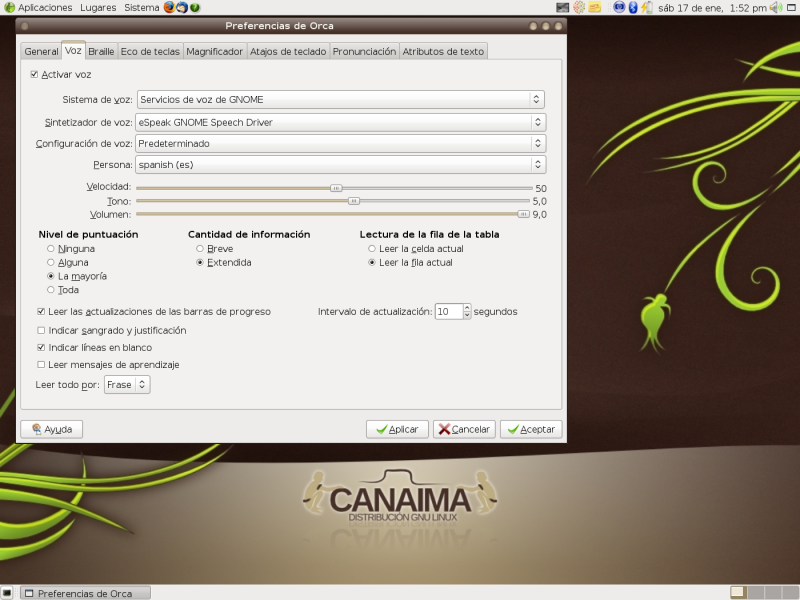
Gnome-Orca accede a la síntesis de voz utilizando lo que se conoce como sintetizadores o motores de voz, como puede ser Gnome-Speech o Festival. Cada sintentizador incluye sus voces femeninas y masculinas (en castellano).
Festival [7] es uno de los sintetizadores libres más completo, puede reproducir con claridad todos los textos en castellano que se muestran en pantalla mediante el uso de un lector de pantalla (orca). Por su parte, Gnome-speech incorpora en las librerías de Gnome las últimas tecnologías de síntesis de voz.
Como magnificador de pantalla Orca usa Gnome-mag (ver Figura 6), este lo usaba Gnopernicus, antigua suite de accesibilidad de Gnome, y ahora lo usa Orca. El magnificador proporciona seguimiento automático del foco y magnificación a pantalla completa para ayudar a los usuarios con visión reducida. También es posible usar en Gnome otros magnificadores
Orca accessed Gnome-speech synthesis using what is known as voice synthesizers or engines, such as Gnome-Speech or Festival. Each synthesizer includes male and female voices (in Castilian).
Festival [7] is one of the most comprehensive free synthesizers can clearly reproduce all Castilian texts displayed on screen by using a screen reader (orca). Meanwhile, Gnome-speech features in the latest Gnome libraries speech synthesis technologies.
As used Orca screen magnifier gnome-mag (see Figure 6), this was using Gnopernicus, old Gnome Accessibility suite, and now uses Orca. The magnifier provides automatic focus tracking and fullscreen magnification to assist users with low vision. You can also use other magnifiers in Gnome

Teclado en pantalla
Los teclados en pantalla son aplicaciones que permiten utilizar un teclado mostrado en pantalla como dispositivo de entrada de datos. Estas aplicaciones estan orientadas a los usuarios y usuarias que no pueden utilizar ambas manos o tienen movilidad reducida en las mismas. Gnome Onscreen Keyboard (GOK) [9] es un teclado en pantalla que además de entrada de texto básico, también ofrece facilidades para controlar el comportamiento de todo el escritorio a través del teclado en pantalla por la recopilación de información sobre otras aplicaciones y el envío de señales de control a través del marco de tecnología de asistencia de AT-SPI. En la figura 7 se muestra el funcionamiento de GOK.
Screen Keyboard
The screen keyboards are applications that allow using a keyboard displayed on the screen as input device. These applications are oriented users and users who can not use both hands or have them reduced mobility.
Gnome Onscreen Keyboard (GOK) [9] is an onscreen keyboard that besides basic text entry, also provides facilities for controlling the behavior of the entire desktop across the screen keyboard for gathering information about other applications and sending control signals through the assistive technology framework for aT-SPI. Figure 7 shows the operation of GOK.
The screen keyboards are applications that allow using a keyboard displayed on the screen as input device. These applications are oriented users and users who can not use both hands or have them reduced mobility.
Gnome Onscreen Keyboard (GOK) [9] is an onscreen keyboard that besides basic text entry, also provides facilities for controlling the behavior of the entire desktop across the screen keyboard for gathering information about other applications and sending control signals through the assistive technology framework for aT-SPI. Figure 7 shows the operation of GOK.

Daltonismo y librería libcolorblind0
Esta librería proporciona una forma unificada para recalcular los colores del escritorio, con el fin de presentar alternativas de las imágenes útiles para personas con daltonismo
Blindness and bookstore libcolorblind0
This library provides an unified way to recalculate the desktop colors, in order to present alternative images are useful for people with color blindness
This library provides an unified way to recalculate the desktop colors, in order to present alternative images are useful for people with color blindness

DISCAPACIDAD MOTORA:
Dasher
So far we have described the accessibility tools that are related to the Gnome desktop, but it is interesting to list some other free applications, classified according to disability that are oriented. Application development is focused on three disabilities: visual, this was discussed extensively in the previous section, the motor and auditory.
Motor disability:
Dasher
This is an application to replace the conventional keyboard by a hand operated devices such as a mouse or joystick, or eye movements or head by using appropriate equipment (with the clarification that the latter do not affordable), achieving a speed close to using the keyboard.
This is an application to replace the conventional keyboard by a hand operated devices such as a mouse or joystick, or eye movements or head by using appropriate equipment (with the clarification that the latter do not affordable), achieving a speed close to using the keyboard.

Reconocimiento de voz
Estas aplicaciones tienen una gran importancia para las personas con movilidad reducida ya que les permite trabajar con el computador haciendo uso solamente de un micrófono.Hasta hace poco tiempo no existía una aplicación que reconociera correctamente la entrada de voz por un micrófono para crear documentos de texto, manejar el escritorio o cerrar y abrir aplicaciones con comandos de voz.
DISCAPACIDAD AUDITIVA
Se incluyen los reproductores de video que soporten closed captioning (mplayer o xine), aunque es importante resaltar que la limitación más importante es que no abunda contenido que lo aproveche (videos o películas con esta propiedad).
Para aquellas aplicaciones que utilizan eventos sonoros (como la consola), es posible configurar la campana o timbre del sistema como un aviso visual. Para ello basta con acceder al gnome-control-center y configurar las opciones del sonido, para que la campana se ejecute mediante eventos visuales.
PRÓXIMOS PASOS
Otra actividad en la que se quiere incursionar es en el empaquetamiento de nuevos desarrollos orientados a la accesibilidad, es el caso de aplicaciones como el mousetrap [12] o el reproductor de libros Daisy DBR [13].
Se han realizado investigaciones sobre las aplicaciones que existen en Software Libre orientadas a personas con discapacidad intelectual, encontrándose un considerable número de ellas que a la fecha requieren las respectivas pruebas de campo
Speech Recognition
These applications are very important for people with reduced mobility and allowing them to work with the computer using only a microphone.
Until recently there was an application that correctly recognize speech input through a microphone to create text documents, manage your desktop or close and open applications with voice commands.
HEARING IMPAIRED
Includes video players that support closed captioning (mplayer or xine), although it is important to emphasize that the most important limitation is that you can enjoy it abounds content (videos or movies with this property).
For applications that use sound events (like the console), you can configure the bell or buzzer system as a visual warning. To do this just go to gnome-control-center and configure the sound so that the bell is run by visual events.
NEXT STEPS
To date there is no accessibility installation system that can be used independently by people with visual disabilities (in the first stage), to be as specific functionality very few distributions that have made this development therefore this functionality represents a real technical challenge and from GNU / Linux Canaima respective studies are done to address this development.
Another activity that you want to dabble in the packaging is new developments aimed at accessibility, is the case of applications like mousetrap [12] or the Daisy book player DBR [13].
Research has been conducted on the applications that exist in free software oriented to people with intellectual disabilities, finding a considerable number of them that require the respective date field tests
These applications are very important for people with reduced mobility and allowing them to work with the computer using only a microphone.
Until recently there was an application that correctly recognize speech input through a microphone to create text documents, manage your desktop or close and open applications with voice commands.
HEARING IMPAIRED
Includes video players that support closed captioning (mplayer or xine), although it is important to emphasize that the most important limitation is that you can enjoy it abounds content (videos or movies with this property).
For applications that use sound events (like the console), you can configure the bell or buzzer system as a visual warning. To do this just go to gnome-control-center and configure the sound so that the bell is run by visual events.
NEXT STEPS
To date there is no accessibility installation system that can be used independently by people with visual disabilities (in the first stage), to be as specific functionality very few distributions that have made this development therefore this functionality represents a real technical challenge and from GNU / Linux Canaima respective studies are done to address this development.
Another activity that you want to dabble in the packaging is new developments aimed at accessibility, is the case of applications like mousetrap [12] or the Daisy book player DBR [13].
Research has been conducted on the applications that exist in free software oriented to people with intellectual disabilities, finding a considerable number of them that require the respective date field tests